
Artificial intelligence has revolutionised visual creation, allowing anyone—from marketers and designers to small business owners and hobbyists—to generate high-quality images with simple text input. AI image generators like Midjourney, DALL·E, Stable Diffusion, and Adobe Firefly are now widely used to create product photos, concept artwork, character designs, advertisements, and more.
However, the real secret behind producing a truly stunning AI-generated image is not the software itself but the quality of the prompt you write. Learning how to prompt AI to create an image effectively can drastically improve the accuracy, style, and creativity of your visual results. This guide explains how to write powerful prompts, provides clear examples, and outlines professional strategies to help you achieve consistent, high-quality outcomes even without design experience.
What Is an AI Image Prompt?
An AI image prompt is a text input that tells an AI model what to create. It serves as a set of instructions that describes the subject, environment, style, composition, lighting, and desired details of the final image.
Think of it as briefing a digital artist: the more specific and expressive your instructions are, the closer the AI can align with your creative vision. A well-crafted prompt helps the AI understand both the technical and artistic requirements, leading to images that match your expectations with much higher accuracy.
How to Prompt AI to Create an Image: Step-by-Step Guide
Learning how to prompt AI to create an image begins with understanding the structure of an effective prompt. A complete prompt typically starts with a clear subject, followed by contextual details such as setting or environment. It continues by specifying a visual style, a camera angle or composition, lighting conditions, and any additional creative or technical details you want the AI to follow. When all these elements are combined into one coherent description, the AI has everything it needs to generate a polished and visually appealing result.
A Complete Prompt Formula You Can Use
A useful formula for creating a strong AI prompt combines all essential elements into one structured sentence. You can follow this template:
[Subject] + [Action or Description] + [Environment] + [Style] + [Camera Angle] + [Lighting] + [Additional Details].
For example, you might write: “A futuristic electric scooter racing through a neon-lit cyberpunk alley at night, digital art style, wide-angle composition, cinematic lighting, reflective wet surfaces, highly detailed 8K render.” This formula keeps your instructions clear and comprehensive.
Start with a Clear Subject
The foundation of every AI image prompt is the main subject. A strong subject description ensures that the AI fully understands what the image is about. For example, instead of saying “a scooter,” you could describe “a futuristic electric scooter,” immediately giving the AI a more focused creative direction. A clear subject reduces ambiguity and helps the model prioritise what you care about most in the frame.
Add Context and Environment
Once the subject is defined, adding environment details helps bring the scene to life. The setting provides narrative value and makes the image visually interesting and meaningful. For instance, describing a futuristic electric scooter “racing through a neon-lit cyberpunk city” creates a dynamic and immersive environment. Similarly, a fantasy castle “floating above the clouds” or a black cat “sitting inside a retro 80s diner” enables the AI to build a cohesive world around your subject. The more vivid and specific your context is, the richer your final image will look.
Define the Visual Style
Style is one of the most important components in AI image generation because it shapes the overall appearance, texture, and tone. When you specify a style—such as photorealistic, digital painting, 3D render, anime art, watercolour, or cinematic—you guide the AI toward a consistent aesthetic. For example, describing a scene as “photorealistic with ultra-detailed textures” produces a very different outcome compared to “soft watercolour illustration.” Without stylistic direction, the AI may mix multiple aesthetics or choose one that does not match your vision.
Choose a Camera Angle or Composition
Camera angle determines how the subject is framed and viewed, which influences the storytelling impact of your image. Describing the angle such as “close-up portrait,” “full-body shot,” “wide-angle view,” or “bird’s-eye perspective” allows you to control the viewer’s position and perspective. For example, an isometric view of a floating fantasy castle creates a structured, game-like appearance, while a macro shot of a flower emphasises texture and detail. Having a defined angle prevents the AI from choosing random compositions.
Specify the Lighting
Lighting profoundly affects the mood, realism, and atmosphere of an AI-generated image. Describing lighting conditions such as “soft natural light,” “golden hour glow,” “cinematic lighting with dramatic shadows,” or “neon reflections” helps shape the visual tone. For instance, a futuristic electric scooter illuminated by neon blue highlights produces a different emotional response than the same scooter photographed under warm studio lighting. Lighting adds personality and depth, so specifying it ensures a cohesive result.
Add Extra Details for Precision
Adding extra details refines the final output and helps the AI avoid making assumptions. These details can describe colour palettes, textures, materials, emotions, or special effects. For example, describing “chrome metallic surfaces with high contrast reflections” or “atmospheric fog surrounding the castle” enhances realism and artistic quality. These finishing touches give the AI clearer boundaries and lead to more polished images.
How to Create Image Prompt in Chatgpt
Good vs Bad Prompt Examples
Bad prompts fail primarily due to vagueness. For instance, a prompt like “create a scooter in a city” lacks detail, style, and direction, so the AI must guess many aspects.
A good prompt, however, might describe “a sleek futuristic electric scooter racing through a neon-lit cyberpunk street at night with cinematic lighting and reflective wet ground,” giving the AI everything it needs to produce a visually rich and accurate image. The difference lies in specificity and clarity.
Professional Tips for Better AI Image Prompts
Writing effective prompts requires refining your descriptive language. One useful technique is incorporating vivid adjectives such as “vibrant,” “high-contrast,” “minimalist,” or “ultra-detailed,” which help the AI narrow the visual style.
Avoid contradictory instructions like “minimalist but highly detailed,” as such conflicts confuse the model. Many AI generators also allow stylistic references to certain art movements or well-known creators, which can help you achieve a specific aesthetic, though you should always follow the platform’s content guidelines.
If the tool supports negative prompts, you can also specify what you do not want in the image, such as “no text,” “no distortion,” or “no extra elements,” ensuring a cleaner output.
How Different AI Tools Interpret Prompts
Different AI image generators interpret language in unique ways. Midjourney tends to produce artistic, stylised visuals and responds well to longer descriptive prompts. DALL·E excels at accurately following instructions and is strong for product images or conceptual compositions. Stable Diffusion is highly customisable, supports both positive and negative prompts, and is ideal for users who want full control. Understanding how each model reads prompts can help you adjust your wording for better results.
Example Image Prompts for Inspiration
To help you get started, imagine asking the AI to create a photorealistic product image by describing “a high-end electric scooter placed in a minimalist modern living room with soft natural lighting, shallow depth of field, and ultra-detailed textures.”
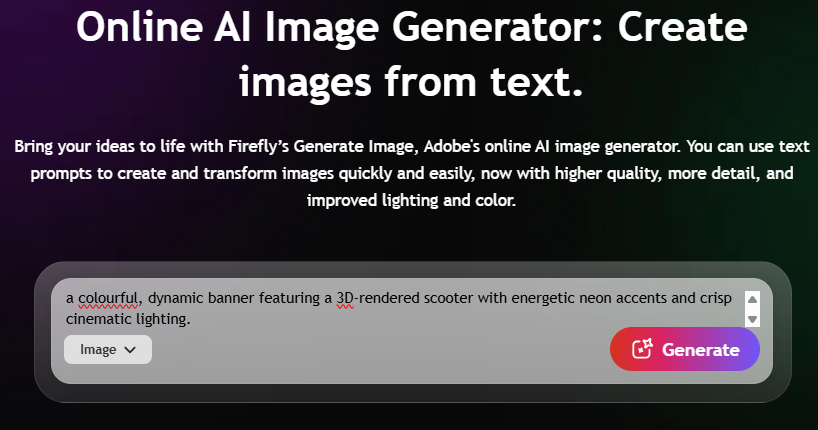
For advertising visuals, you might request “a colourful, dynamic banner featuring a 3D-rendered scooter with energetic neon accents and crisp cinematic lighting.”
For fantasy artwork, you could describe “a glowing magic sword suspended in a dark enchanted forest surrounded by mist and illuminated by dramatic cinematic rays.”
Each example shows how descriptive paragraphs lead to professional-quality results.
Conclusion
Learning how to prompt AI to create an image is a creative skill that grows with practice. The more clearly you describe your subject, environment, style, composition, lighting, and details, the more accurate and visually appealing your AI-generated images become.
By applying consistent structure and descriptive language, you can produce professional-level visuals for marketing, design, storytelling, or personal projects. The prompt acts as your creative blueprint, and once you master it, AI becomes a powerful artistic partner capable of bringing your ideas to life with remarkable precision.